"This Product Key Has Already Been Used" — Real Causes and a Clear Fix Guide
Karınca Lisans16 min read

Products Mentioned in This Post
Summarize this article with AI
Your assistant reads the article and summarizes it for you.
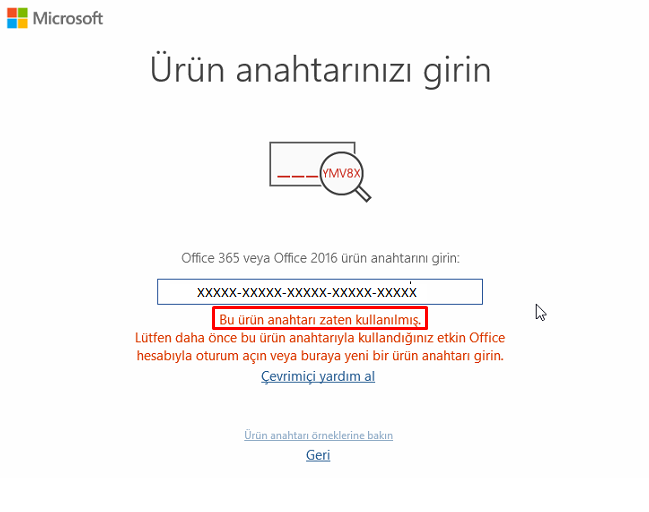
The “This product key has already been used” message is not a single “error”; it is an umbrella of warnings. Sometimes it is completely harmless (especially in Office: the key has simply already been added to your account), and sometimes it is a straight-up red flag (especially in Windows: the key has been activated on another device, the limit has been exceeded, it came from the wrong license channel, or the seller sent you a problematic key).
Because the user type (individual/business), the product (Windows/Office), the license channel (OEM/Retail/Volume), and the purchase channel (official/third party) are not specified, this article covers all the main scenarios. The clear goal: solve the error not through “trial and error,” but with evidence + the right process.
The most critical distinction is this:
- On the Office side, this message usually means “you have already redeemed the key; the product has been added to your account.” The solution: stop trying to re-enter the product key and install/activate through “Services & subscriptions” with the correct Microsoft account.
- On the Windows side, this message or its variants (e.g. 0xC004C008) usually mean “the key has been used on another device, or the number of devices allowed by the license terms has been exceeded.” This is a typical outcome, especially in the “cheap digital key” market.
If you end up having to get your money back or escalate the dispute, collecting evidence and following the official application path become important. In Türkiye, the refund/repayment obligations in distance contracts and the digital content exceptions are explained by the Turkish Ministry of Trade.
To avoid facing these errors in the first place — instead of wasting time reading articles like this online — you can choose the Windows and Office license options available at Karınca Lisans. It is the trusted source of genuine, affordable licenses, and its after-sales WhatsApp live support team always stands by its users!What the error message means and what it covers
What the message means
This message says the system believes “this key cannot be used again in the same scenario.” By “the system” we usually mean the activation/setup servers and the license–hardware relationship of the device: activation is used to check whether the software is genuine and compliant with the license terms — at the very least, “that the same key has not exceeded its limits.”
That is why the same-looking message can lead into two different worlds:
- During Office setup: “the key has already been used” = most of the time it has already been assigned to your account; you do not need to enter the key again.
- During Windows activation: “the key has already been used” (e.g. 0xC004C008) = another device / a limit / an incompatible license.
On which screens it appears
- In Office, it usually appears in the “key redemption” flow at office.com/setup / Microsoft365.com/setup; Microsoft explicitly states that this page is for “new, unused keys.”
- In Windows, it usually appears under Settings > Activation together with a “We can’t activate…” message and codes such as 0xC004C008. Microsoft describes this as “the key may have been used on another device, or it may have exceeded the allowed number of devices.”
Root causes and the technical map
Comparison table: possible causes, likelihood, and the first move
The “likelihood” ratings below are not statistics; they are a heuristic classification based on the patterns most frequently seen in the field. For a definitive diagnosis, apply the verification steps in the following sections.
| Possible cause | Typical symptom | Likelihood | Suggested first move |
|---|---|---|---|
| The Office key has already been added to your account | “Already used” in the setup flow; yet the product may actually be yours | High (Office) | Stop re-entering the key; install from “Services & subscriptions” with the correct account / activate by signing in |
| The key was previously activated on another device / the limit has been exceeded | 0xC004C008 in Windows; “used on another device” | High (cheap keys) | Quick technical checks + request a new key/refund from the seller; collect evidence |
| License channel mismatch: OEM / Retail / Volume | Activation breaks after a motherboard replacement; or corporate (KMS) traces | Medium-High | Clarify the license type and transfer rights; reactivate with the correct license if necessary |
| Version/edition mismatch (Home/Pro/Enterprise) | An error like “key for a different edition”; activation refusal | Medium | Match the key’s edition with the installed edition; switch to the correct edition if needed |
| Region/country mismatch (especially Office keys) | “The key is not valid in your region” / “different country” errors | Medium (Office) | Turn off your VPN; check the country/subscription restrictions Microsoft specifies, and ask for support |
| Typo/format error or copy-paste corruption | “Invalid key” / character error | Medium | Check the 25-character format; check for dash/character conversion during copying |
| Activation server/connection problem | “The server is temporarily unavailable”; internet/firewall/time-date issues | Low-Medium | Internet, time and date, firewall; then try again; phone activation if necessary |
| Seller delivery/automation error (wrong key, duplicated email) | The same key appears to have gone to several people; you have an invoice but the key is wrong | Medium | Collect the order/delivery logs and email headers; ask the seller for a re-delivery (in writing) |
Details of the technical causes
Previously activated keys and activation limits
On the Windows side, 0xC004C008 and similar error codes fit — in Microsoft’s own words — the pattern of “the key may have been used on another device, or it may have exceeded the number of devices allowed by the license terms.” Hardware manufacturer documentation explains it along the same lines: this error can appear when the activation server detects that the key may have been used on more than one PC. At this point, the problem is often not “your fault” — the key was already dirty/duplicated.
In the corporate world (KMS/MAK), the limit logic is stricter: Microsoft’s Windows Server activation error codes document associates 0xC004C008 with exceeding the KMS key limit and gives example activation limits for KMS host keys. Even though this document was not written directly for the “home user” context, it lays bare how the “key pool/limit” mechanism works.
OEM – Stand-alone (Retail) – Volume: they are not the same thing
If your Windows license came “with the device,” the real discussion is less about the license’s “key” and more about the device-bound right of use. Microsoft’s Windows 11 OEM (pre-installed) license terms address transferring preinstalled software only together with the licensed device and with its label/COA when handing it over to another user. Selling the key on its own as “free-floating” merchandise contradicts this logic.
On the other hand, in the “stand-alone software” (retail/separately purchased) scenario, the same license terms say the software can be transferred to another device only under conditions such as removing it from the previous device. In short: a “cheap key sold as OEM” and a “retail license” do not carry the same set of rights.
Hardware changes: why a motherboard replacement is critical
Microsoft explicitly writes that a digital license is associated with the device’s hardware and that after “significant hardware changes” such as a motherboard replacement, Windows may fail to find a matching license. In that case reactivation is required, and if the license was linked to a Microsoft account, this process can be handled through the Activation troubleshooter.
This is the most technical answer to the question “I reinstalled Windows on the very same computer — why does it say already used?”: the system centers not on the reinstall but on the hardware identity; if there is a notable change in the hardware identity, the “new device” treatment can be triggered.
Edition mismatch: the Home/Pro/Enterprise trap
Microsoft states that an error can appear when activating with a wrong-edition key, that the key must match the installed Windows edition, and that if necessary you should switch to the correct edition or install it. That is why keys sold as a “Windows 11 Pro key” but actually coming from a different channel may not behave as promised on a Home installation.
Key format, typos, and copy-paste corruption
Microsoft defines the standard 25-character format of a product key. The enterprise error codes document, meanwhile, captures a practical detail: when pasting from the clipboard, hyphens turning into different characters such as an “em-dash,” or character mix-ups, can cause an error. This is a simple but surprisingly common user mistake.
The region/VPN effect: not a direct cause, but a possible trigger
On the Office side, the region issue is clear: Microsoft writes that some product keys are expected to be used in the country/region where they were purchased, and that a country/region mismatch can produce an error. Here, a VPN is less a “root cause” and more a trigger that can create a false region reading (this inference is based on Microsoft’s explanations of region restrictions and online account verification).
Bad faith and seller-driven risks
Fraud/misleading-seller scenarios
Three models are seen most often in this market:
Selling used keys: The seller sends the same key to several people, or sells an “already used” key as “brand new.” In Türkiye, consumer complaint platforms such as Şikayetvar regularly show examples themed around “used license keys”; this does not create legal consequences on its own, but it demonstrates the pattern.
Marketing volume keys to individuals: When the keys of corporate licenses are dumped into individual sales, even if they work in the short term, they carry limit/audit/revocation risk in the medium term. Microsoft’s volume activation logic (KMS/MAK limits, the KMS server requirement, etc.) already says these keys are designed “for organizations.”
Counterfeit/compromised keys: In its license terms, Microsoft describes mechanisms in counterfeit or improperly licensed cases that range from activation attempting to “repair” itself to showing warnings to the user; it also specifically cautions that “even if activation succeeds, this does not prove the software is genuine and properly licensed.”
What these three models have in common is this: you buy a “key,” but the legal and technical substance of what you actually bought is uncertain. The result: the “already used” message.
The keygen/crack approach: not a quick fix, but a quick shipwreck
This article does not explain cracks/keygens, because that is not a “solution”; it is a production line for license violations and security risks. Microsoft’s license terms explicitly prohibit bypassing activation and describe the detection of counterfeit/improper licenses as part of the activation process. Microsoft’s security content also offers resources for protecting yourself from the counterfeit software and fraud ecosystem; even the existence of official channels such as the “counterfeit software report” shows the scale and seriousness of the problem.
Seller-driven delivery errors
Not every case is fraud. Sometimes it is a “simple organizational mistake”:
- Sending the wrong product key (wrong product/wrong edition)
- Sending the same email/key block to multiple customers through automation
- A duplicated email chain or a manual copy-paste mistake
In these scenarios, what matters from the very first minute is not trying 20 times “just in case it works”; it is locking in the evidence and requesting a formal correction from the seller. Too many attempts can trigger security/suspicion filters in some systems (this inference is based on Microsoft’s explanations that activation proceeds through the hardware profile and server verification).
Verification and evidence collection
For a diagnosis, lock in the facts first
The steps in this section are not a “technical show”; they are the infrastructure for winning the argument with the seller and, if needed, the official application.
Which product? (Not specified) Windows or Office? The same error text can mean two different things.
In which flow did the error appear?
- Office: was it at office.com/setup / Microsoft365.com/setup?
- Windows: was it on the Activation screen, and is there an error code? (e.g. 0xC004C008)
Is the license linked to a Microsoft account? (Not specified) For Windows, Microsoft says that linking the digital license to your account makes reactivation easier after a hardware change.
The evidence package: the minimum set
Each of the items below lifts the complaint from “it didn’t work for me” to the level of an “evidenced dispute”:
- A screenshot of the error screen (with the error code and the date/time visible)
- Proof of purchase: invoice/payment receipt/order number
- The seller’s delivery email (full headers if possible; at minimum the date-time and the recipient address)
- Information about the device you tried on and the installed edition (in Windows, the Settings > Activation screen)
- The product view in your Microsoft account (“Services & subscriptions” for Office, the activation status screen for Windows)
Microsoft’s counterfeit software reporting form explicitly states that it asks for details such as “where it was purchased”; in other words, it is also clear along which axis the evidence is expected.
Which claim is proven with which evidence?
- The claim “the key has already been added to my account” → the product appearing on the account’s subscriptions/services screen (the Office approach).
- The claim “the key was used on another device” → the Windows error code (0xC004C008 etc.) + the seller’s delivery proof + information showing the device is new/the only device.
- The claim “region mismatch” → the Office region error screen and the mismatch between the country where the key was purchased and the subscription country.
- The claim “it broke after a hardware change” → Microsoft’s post-hardware-change reactivation steps + a record of the device change (motherboard replacement etc.).
The prioritized solution path
Timeline: the flow from the moment of the error to the solution
This flow is consistent with Microsoft’s account-based management of Office keys and its hardware-change/Activation-troubleshooter approach in Windows.
Quick fixes
The right fix for Office: use the account, not the key
Microsoft’s approach is clear-cut: to install/activate Office you use a Microsoft account, not a product key; once the product key has been redeemed, the product is added to your account and you do not need to enter the key again. So if you are seeing “already used,” do not panic: most likely you are simply doing the wrong thing on the wrong page.
Quick checks for Windows
- Edition match: the installed edition and the key’s edition must match. Microsoft explicitly writes that activation can be refused on an edition mismatch.
- Internet and basic system conditions: activation requires the internet; the troubleshooter also works through an online flow.
- Time-date and connectivity: Microsoft states that activation must connect to an online service, and that errors can appear with connection/firewall problems.
- Key format: verify the 25-character format; check for the possibility of copy-paste character conversion.
Communicating with the seller: talk “with a file,” not “with emotions”
The templates below were written to present the seller with a clear choice, without dramatizing the matter.
Formal complaint and remedy request template for the seller
Subject: Order No [XXXX] – “Product key has already been used” error / Urgent remedy request
Hello, When I try to use the product key delivered to me in order [Order No], which I placed on [date] for [product name – Windows/Office, edition], I get the “[error text]” error. The error screen and the order/payment documents are attached.
There are two possible explanations of the situation:
- I was sent the wrong key, or
- The key sent to me has already been used / exceeded its limit.
My request is clear:
- Within 24 hours, delivery of a working, unused key for the correct edition, or
- A refund of the full amount.
During this process, without increasing my attempt count, I expect a written resolution so the harm does not grow. Kind regards.
Attachments:
- Error screenshot
- Order/payment document
- Delivery email
The logic behind this approach: seller-driven delivery errors and used-key scenarios are among the causes seen most often in practice.
The Microsoft support process: what to ask for and how
On the Windows side, Microsoft’s own guides describe the “I changed hardware on this device recently” flow with the Activation troubleshooter after a hardware change. On the Office side, they say the “already used” message is usually resolved through the account.
Still, for suspicions like “my key looks used/stolen,” Microsoft has the “Counterfeit Software Report” channel, where information such as the purchase source is requested.
Microsoft support request template
Subject: Activation problem – “[Error code/text]” / Proof of purchase available
Hello, I am getting the “[error text]” error during activation for [product: Windows/Office, edition].
- Product type: [Windows/Office]
- Edition: [Home/Pro etc.] (not specified/identified)
- Purchase source: [Seller name / platform]
- Order/transaction no: [XXXX]
- Error code: [0x…] (if any)
- Screenshots and the proof of purchase are attached.
Request:
- Is this key/subscription assigned to my account? (especially for Office)
- Does this key have a usage status/limit problem?
- If my license is valid, what is the official step to follow for reactivation?
Thank you.
This text is based on Microsoft’s explanations that activation is tied to the hardware profile and that reactivation is required in some cases.
Refunds, chargebacks, and consumer remedies
Separate two concepts here:
- The right of withdrawal (14 days): it is the general rule in distance contracts; however, there can be exceptions for digital content and intangible goods that are “performed/delivered instantly.”
- Defective goods/services: if what you bought does not work or is not of the promised quality, the optional rights under the “defective performance” framework come into play regardless of the “withdrawal exception” debate. The Ministry explains the optional rights for defective goods, including a refund of the price, and that the seller is obliged to fulfill the remedy the consumer chooses.
It is additionally stated that in refund/repayment processes in Türkiye, the seller must issue the refund within a specific period from receiving the withdrawal notice, free of charge, and via the payment method the consumer used. If the seller does not resolve it, there is a Consumer Arbitration Committee application screen on the e-Government Gateway (e-Devlet). Furthermore, it was announced officially that the Consumer Arbitration Committee monetary threshold for 2026 is below 186,000 TL; in other words, most digital license disputes stay within this threshold.
Bank/chargeback objection text template
Subject: Card payment dispute – Digital product key does not work / seller offers no remedy
Hello, I am disputing the “[merchant name]” payment of [amount] TL that I made with my card on [transaction date].
Reason: The digital product key I purchased does not work; the system gives the “This product key has already been used” error. I contacted the seller in writing; no remedy/refund was provided.
Attachments:
- Error screenshot
- Correspondence with the seller
- Order/payment document
- (If any) The seller’s refund rejection
Card payment dispute processes can vary by bank and card scheme; this text is for presenting the “evidence set” in an organized way. (Verify the deadline and procedure with your bank.)
The skeleton of this section is based on the emphasis the Ministry’s guides place on refunds and the culture of proof in distance contracts.
Preventive measures and a purchase checklist
Treat this not as a “shopping guide” but as risk management — because in this market, the risk is real.
- Think of the product not as a key, but as a license right. Microsoft’s license terms explicitly say that activation is required for licensed use and that “even with activation,” the conclusion is not always “properly licensed.”
- Clarify the preinstalled/OEM versus stand-alone distinction before you buy. The transfer of preinstalled software is handled together with the device; the transfer of stand-alone software is tied to conditions such as removal from the old device.
- On the Office side, know that the product key is a single-use “redeem” object. Microsoft says the product key can be used once and is not intended to be reused; it also states that the key should not be shared in a family subscription.
- Check region/country compatibility (especially for Office). Microsoft explains that geographic errors can occur when using keys purchased from a different country/region.
- Too cheap = too much risk. This is not a moral lesson; prices that contradict the activation system’s limit logic mean, in practice, a “key of uncertain lifespan” (this inference is based on the official explanations of the limit-exceeded and used-on-another-device logic).
- Before purchasing, ask the seller for these three things in writing:
- The license channel (OEM/Retail/Volume)
- The edition (Home/Pro etc.)
- The refund/replacement terms (especially “if the key does not work”) This strengthens your hand later in a “defective performance” dispute.
Guaranteed Genuine Licenses: Karınca Lisans
To avoid running into counterfeit or already-used keys again, buy from a genuine, invoiced source. Our Windows 11 Pro and Office 365 Pro Plus licenses are activated through official Microsoft channels and delivered with an activation guarantee. For all the options, visit our Windows licenses and Office licenses categories.