ChatGPT Business vs Plus: What's the Difference and Which Should You Buy?
Karınca Lisans17 min read
Products Mentioned in This Post
Summarize this article with AI
Your assistant reads the article and summarizes it for you.
Author's Summary
As of May 2026, according to official OpenAI documentation, the most sensible choice for single-person, intensive but personal use is in most cases ChatGPT Plus; for a team of at least two people, company data, centralized billing, SSO, and basic governance needs, it is ChatGPT Business. The critical point is this: today, Plus is more powerful than many buyers assume; projects, tasks, custom GPTs, data analysis, deep research, apps, and apps that connect to internal tools are already available on Plus. The extra cost of Business is essentially paid not for a “smarter model” but for the workspace, identity, administration, and data policy.
That is why, in practice, the purchasing question should be rewritten as: “Am I buying better individual productivity, or corporate governance?” The answer to the first question is usually Plus. The answer to the second is usually Business. However, if you need compliance, automated user lifecycle management, data residency, granular role-based access control, EKM, or a contractual SLA, even the axis of comparison changes; at that point, it is Enterprise, not Business, that comes into play.
The short decision:
- Single user / power user / freelancer: Buy Plus.
- SMB / startup / agency / team of 2+: Buy Business.
- If you need regulatory compliance, SCIM, data residency, a custom security review, invoicing, and an SLA: Consider Enterprise instead of Business.
One important note: OpenAI's public model documentation is currently in transition. While the most up-to-date ChatGPT-wide help article lists the current model names as GPT-5.3 Instant + GPT-5.5 Thinking/Pro, some Business-specific limit pages still list GPT-5.4 / GPT-5.2 counters. In the report below, I relied on the newest and most comprehensive ChatGPT documents for model access, and I have flagged the conflicting points separately.
Key differences and comparison table
The table below gathers in one place the main topics that affect the purchasing decision. The term “Not specified” indicates that there is no clear explanation on OpenAI's public pages, or that the outcome may vary by region/rollout.
| Feature | ChatGPT Plus | ChatGPT Business | What it means for your decision |
|---|---|---|---|
| Target user | Designed for individual use. | Built for businesses; the entry threshold is at least 2 users. For scenarios with 250+ members, OpenAI points to Enterprise. | Plus for one person; Business for a team. |
| List price | $20/month, billed monthly. | $25/user/month billed monthly or $20/user/month billed annually for a standard seat; regional currency and local price differences may apply. | With 2 seats, the entry cost rises noticeably on the Business side. |
| Billing | Monthly subscription; ChatGPT and API billing are separate. Mobile and web subscriptions may be processed through separate systems. | Monthly or annual; unified workspace billing is available. Self-serve supports credit/debit cards only; there is no invoicing, ACH, wire transfer, PO, or split payment. | If finance/procurement is simple, Business is enough; if you need corporate invoicing, Business may fall short. |
| Core AI tools | Includes deep research, data analysis, image generation, Canvas, projects, tasks, custom GPTs, record mode, apps, and connections to internal tools. | Includes all of these from Plus; additionally offers company knowledge, workspace GPT sharing, and workspace-level administration. | The feature gap is not on the “AI tools” side as much as people assume; it is on the governance side. |
| Model access | According to current ChatGPT articles, GPT-5.3 Instant and GPT-5.5 Thinking can be selected via the model picker on paid tiers; GPT-5.5 Pro is not available on Plus. | In addition to the same base models, the official plan matrix lists GPT-5.5 Pro access/flexible usage for Business. | If you want the top ChatGPT reasoning tier, Business's model access is superior to Plus. |
| GPT-4 variants | Within ChatGPT, GPT-4o, GPT-4.1, GPT-4.1 mini, and o4-mini have been retired; do not rely on them through a ChatGPT plan. API access continues separately and unchanged. | The same applies; on Business, too, the GPT-4 family has been retired on the ChatGPT side. | Developer teams that specifically want the GPT-4.1 family should look for the right product in the API, not in a ChatGPT plan. |
| Published usage limits | For Plus, OpenAI publishes limits of 160 messages / 3 hours on GPT-5.3 and up to 3,000 messages per week on manual GPT-5.5 Thinking; when the limit is exceeded, mini/fallback behavior may kick in. Credits can be purchased for Codex and Sora. | For Business, the base models are described as “virtually unlimited / subject to abuse guardrails”; some Business limit pages also list reasoning/pro counters. Workspace credits and spend controls are available for Codex and advanced usage. | For heavy team usage, Business is much safer; Plus is good for intensive individual use but technically limited. |
| Training data policy | Content may be used for model training; the user can opt out. | Workspace data is not used for model training by default. | If you are entering company data, the difference is structural, not cosmetic. |
| Retention and export | Chats stay in your account until you delete them; deleted chats are typically scheduled for permanent deletion within 30 days. Temporary Chat is cleared within 30 days and is not used for training. | No public custom retention policy setting is documented for Business; each user's chat history is separate, and there is no data export in a Business workspace. | If retention/eDiscovery matters, Business also remains limited; Enterprise is a better fit. |
| Collaboration | Shared projects are available; but there is no dedicated workspace, company knowledge, or in-workspace GPT sharing. | Includes a dedicated workspace, company knowledge, in-workspace GPT sharing, shared links, and workspace agents. | For team memory and organizational reusability, Business provides a meaningful advantage. |
| Admin and identity | No admin console, admin roles, bulk member management, domain verification, or SAML SSO. | All of these are included; however, there is no SCIM, provisioning is manual, and Business SSO covers only ChatGPT. | If you need IT administration, Business is the minimum bar; for full IAM automation, you still need Enterprise. |
| Security and compliance | General security protections are in place, but the plan matrix does not mark SOC 2/ISO corporate commitments for Plus. | SAML SSO, MFA, encryption, SOC 2 Type 2, CSA STAR alignment, and GDPR/CCPA support stand out; however, in the plan matrix, ISO 27001/27017/27018/27701 appear as “Yes” only for Enterprise. | Business reaches a “business-ready” security level, but it is not at the “enterprise security platform” level. |
| API access | Not included; the API is billed separately and managed separately. | Not included; ChatGPT and the API are separate platforms. Business SSO does not carry over to platform.openai.com by default. | For a team building products, the real budget calculation is usually “Plus/Business plus the API”. |
| Performance and SLA | The official plan matrix describes response speed as Fast; public pages provide no p95 latency or throughput metrics. | The official plan matrix also says Fast for Business; an SLA is explicitly promised only on the Enterprise side. | No clear speed advantage between Plus and Business has been proven in publicly available figures. |
| Regional availability | Available in ChatGPT-supported countries; Turkey is among the supported countries. | No separate Business country list appears to have been published; in practice, the purchase flow is available in countries with ChatGPT access, but local pricing/taxes may vary. Turkey is among the ChatGPT-supported countries. | From Turkey's perspective, both plans appear accessible; the final checkout price should be verified. |
| Migration and upgrades | When joining Business, you can keep your personal workspace separate or merge it. If you merge, the personal space is deleted; the remaining web subscription is refunded, excluding mobile. | Moving from Business to Enterprise goes through the sales team; a Business workspace cannot be merged into another Business workspace. | Plus → Business is relatively easy; Business → the enterprise world depends on the sales process. |
The image below is an editorial coverage summary based on the official plan matrix; it is not a price-performance score. The two plans are close in core productivity, while the divergence is large on the governance and corporate data side.
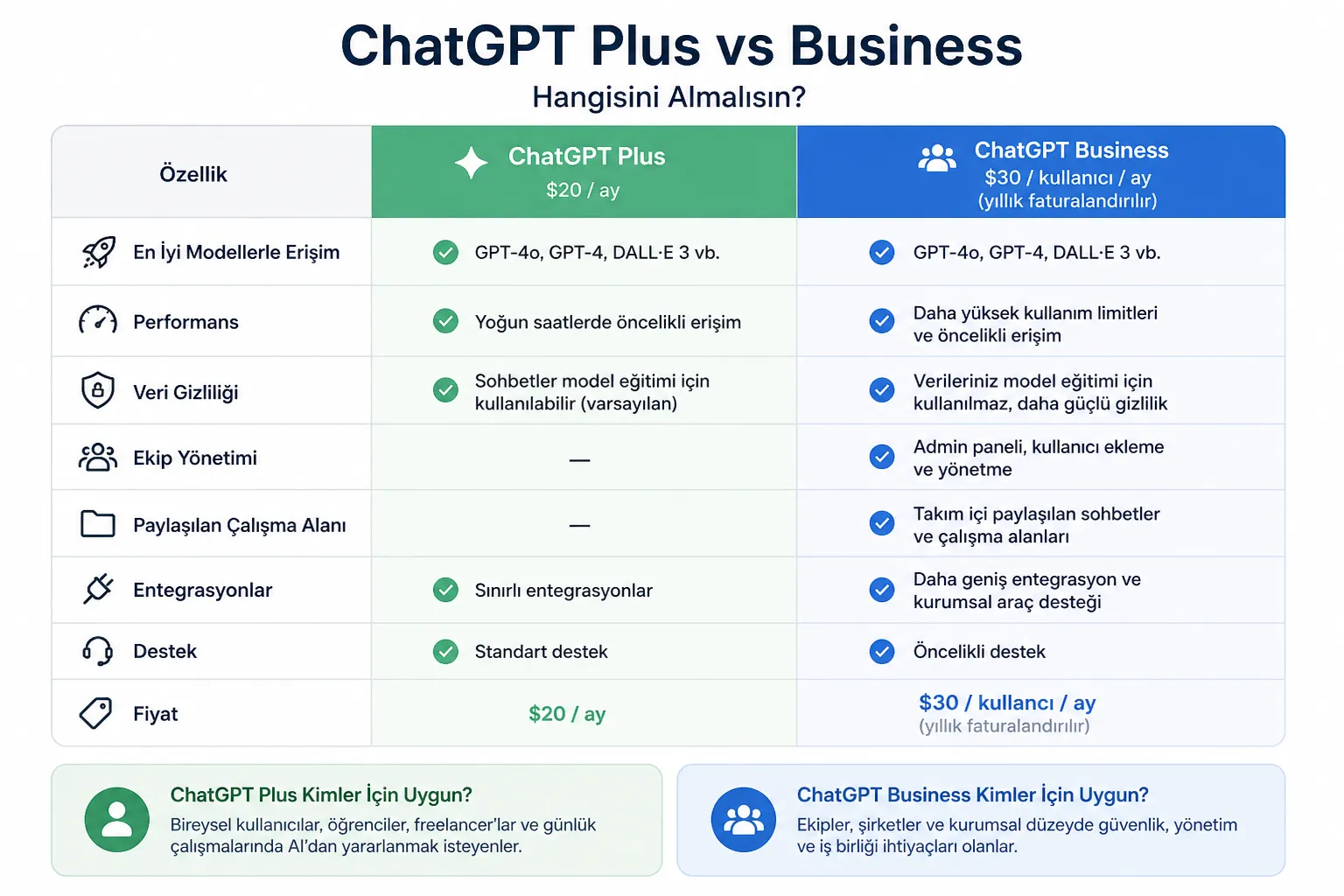
The most important analytical conclusion from this table is this: the main marginal value difference between Plus and Business is no longer “feature richness” but the “corporate control framework.” If your problem is more messages, better research, stronger image generation, and daily workflow, Plus largely solves it. If your problem is how employees sign in, who pays, how GPTs are managed within the workspace, and keeping company data out of training by default, Business is the right product.
At this point, the choice depends entirely on your use case: for individual use, Plus is sufficient, while Business becomes the more sensible choice when teamwork and data security are the priority.
Before choosing the plan that best fits your needs, you may also want to take a look at pricing and access options. To explore these licenses along with different alternatives, head over to
👉 Buy a ChatGPT License
where you can compare the ChatGPT Plus and ChatGPT Business options.
What changed in 2026: standard and premium seats
Since this comparison was first written, OpenAI has changed how Business seats work. According to OpenAI's pricing page (checked in September 2026), a Business workspace can now mix two seat types: a standard seat and a premium seat. A premium seat gives five times the usage of a standard seat and has no 5-hour limit. Business still starts at two users and can be billed monthly or annually.
In practice, this makes Business more flexible for mixed teams: most members can stay on standard seats while the one or two heaviest users get premium seats. It does not change the core decision in this guide. For one person, Plus is still the simpler choice; for a team handling company data, Business earns its price mainly through privacy defaults and admin controls. Seat prices depend on the billing period and your region, so check the current figures on OpenAI's pricing page before you commit.
Privacy, security, and governance
The training data difference is the most critical purchasing distinction between the two plans. On Plus, content may be used for model improvement via a setting the user can turn off; chat history remains visible but can be excluded from training use. On Business, workspace data is kept out of training by default and is handled under the Business Terms and Enterprise Privacy commitments. If employees are entering customer data, proposals, contract summaries, financial statements, CRM notes, or internal documentation, this difference is not merely a legal one; it is an operational risk difference.
On the retention and visibility side, Business is sufficient for most SMBs but limited for organizations that want advanced governance. On Business, each user has their own chat and Codex history; other members cannot see them by default. Shared links are visible within the workspace, and access is denied when they are opened from outside; however, Business offers no option to disable the shared links feature entirely; that control is reserved for Enterprise. In addition, there is no data export in a Business workspace. This combination makes Business a “safe shared space for the team,” but not a full e-discovery / retention governance product.
On the identity and administration side, Business's advantage is clear: it offers an admin console, admin roles, bulk member management, unified billing, a dedicated workspace, domain verification, basic user analytics, and SAML SSO. SSO on Business is self-serve and supports SAML and OIDC; the official SSO FAQ also explicitly states that no extra fee is charged for it. In contrast, there is no SCIM/AD group sync, meaning user provisioning/de-provisioning is manual; furthermore, Business SSO covers only ChatGPT and does not automatically carry over to platform.openai.com. That is why Business is strong for SMBs that have an IT team but do not require full IAM automation; for more mature identity governance, Enterprise is needed.
In security and compliance, Business is positioned as corporately stronger than Plus. While the plan pages highlight SAML SSO, MFA, no-training-by-default, GDPR/CCPA support, CSA STAR alignment, and SOC 2 Type 2 for Business, OpenAI's security page also states that the infrastructure supporting Business has undergone independent third-party auditing. In contrast, in the plan comparison matrix, the ISO 27001/27017/27018/27701 certifications appear as “Yes” for Enterprise, not for Business. In other words, Business is secure and compliance-focused, but it is not a “full enterprise compliance package.”
There is one more small but important nuance: the official documents are partially inconsistent about the Global Admin Console. While the general plan matrix marks this field as “No” for Business, a separate Help Center article says that Global Admin Console access is available for new Business customers and that existing customers are being migrated gradually. The honest interpretation from a purchasing standpoint should be: Business does offer admin and SSO capabilities, but the tenant-level cross-product management experience may vary depending on rollout status.
Performance, availability, and migration paths
On the performance side, publicly available data does not support the claim of a dramatic speed difference between Plus and Business. The official plan matrix labels both plans as “Fast”; no numerical p95/p99 latency, tokens/sec throughput, or tier-based latency targets are published. Enterprise, in the same matrix, is positioned as “Fastest” and additionally with SLAs. Therefore, in terms of performance expectations, the safest thing that can officially be said is this: Plus and Business are in a similar user experience class; Business's premium is mostly about governance.
On availability, OpenAI's status page shows 99.83% uptime for ChatGPT for February–May 2026; but the same page says this is an aggregate measurement across all tiers, models, and error types, and that customer experience may vary by subscription tier, model, and features. In other words, there is no separate public uptime guarantee for Plus or Business. Nor have I seen a public SLA outside of Enterprise.
In terms of regional availability, Turkey is among the supported countries for both ChatGPT and the API. That said, OpenAI does not publicly publish a separate country matrix for ChatGPT Business; the safe interpretation, therefore, is that Business can in practice be purchased in markets where ChatGPT is supported, but local currency, taxes, and checkout terms may vary by region. Additionally, data residency is explicitly offered only for Enterprise; it is not available on Business.
The API side is especially misunderstood. Neither Plus nor Business includes API usage. ChatGPT and the API are separate platforms, separate billing systems, and separate access domains. The Plus help page explicitly says the API is not included; the general billing article repeats that ChatGPT and the API are separate systems; and the Business SSO FAQ states that Business SSO does not carry over to platform.openai.com. As a result, a development team's actual technology basket is usually “Plus + API” or “Business + API”; a “ChatGPT subscription alone” is not a substitute for a production software development license.
On the transition and migration side, OpenAI is quite clear. When a user receives a Business invitation, they can keep their personal workspace separate or merge it into Business. If kept separate, the Plus subscription continues until they cancel it themselves. If they merge, the personal space is deleted, and the web subscription is automatically cancelled/refunded for the remaining period; mobile subscriptions must be cancelled separately. Existing chat history and GPTs are carried over; plugins and custom instructions are not. The merge cannot be undone; moreover, since there is no data export in a Business workspace, this decision should be made carefully. Moving from Business to Enterprise proceeds through the sales team; one Business workspace cannot be merged into another Business workspace.
Persona-based buying recommendations
| Persona | Clear recommendation | Rationale |
|---|---|---|
| Individual power user | Buy Plus. | For a single user, $20/month already gets you advanced reasoning, higher message/file limits, deep research, tasks, custom GPTs, data analysis, apps, and record mode; on your own, you rarely need Business's governance layer. |
| Freelancer / independent consultant | Plus by default; if sensitive client data and corporate policies are involved, Business only if it is worth the cost | For single-account, flexible, low-cost use, Plus is the more rational choice. But if you are entering client data and contractually want “default no-training” instead of a “training opt-out,” Business offers a safer framework. The practical problem here is that Business raises the total cost with its 2-seat minimum. |
| Startup / SMB / agency of 2–20 people | Buy Business. | In this segment, the real value is centralized billing, the admin console, SAML SSO, domain verification, basic analytics, a shared workspace, company knowledge, and in-workspace GPT sharing. Even though the core AI capabilities are strong on Plus as well, team coordination and data policy are meaningfully better on Business. |
| Scaling company of 20–250 people | Business in most cases, but with attention to the checklist | On the business side, Business may be sufficient for SSO and basic governance. However, if you need SCIM, data residency, EKM, RBAC, a custom security review, invoicing, or onboarding, you will quickly hit Business's limits and Enterprise will be required. |
| Large enterprise / regulated organization | Neither Plus nor Business; consider Enterprise. | Business does not offer SCIM, data residency, EKM, Compliance API Logs, IP allowlisting, granular GPT controls, RBAC, custom onboarding, or an SLA. These sit in the Enterprise column. |
| Developer team / product team | Plus + API for a solo developer; Business + API for a multi-user team | A ChatGPT plan is not a substitute for the API. ChatGPT and the API are billed separately. Plus may be enough for a single developer; if there is a team, Business is a better fit with company knowledge, workspace sharing, and spend controls. An API budget is still needed on top. |
This persona split is broadly confirmed by recent independent reviews as well: third-party analyses frame Plus as high value for solo users, and Business as the plan that justifies its extra cost mostly through privacy + admin + workspace governance. These sources are not primary sources; but they arrive at the same practical conclusion as the official OpenAI documents.
Pros, cons, and the final decision
Pros and cons of ChatGPT Plus
| Pros | Cons |
|---|---|
| The price entry threshold is low: $20/month. | No corporate governance: there is no admin console, SSO, domain verification, or bulk member management. |
| The feature set for an individual user is very broad: deep research, data analysis, tasks, custom GPTs, apps, record mode, image generation, and internal tools connections are included. | Content is not covered by a business-data-based “no-training” commitment by default; however, you can opt out. |
| Offers strong reasoning on the model side; current documents list access to GPT-5.3 Instant and GPT-5.5 Thinking. | GPT-5.5 Pro, the top reasoning tier, is not available on Plus. |
| When moving from Plus to Business, you can keep your personal workspace separate or merge it. | The API is not included; for production development, the API must be purchased separately. |
Pros and cons of ChatGPT Business
| Pros | Cons |
|---|---|
| Retains nearly all of Plus's core productivity capabilities while offering default no-training for corporate data. | The entry threshold is higher: at least 2 seats are required; self-serve offers no billing method other than a card. |
| Offers SAML SSO, an admin console, admin roles, bulk member management, unified billing, domain verification, and basic analytics. | No SCIM; provisioning/de-provisioning is manual. Business SSO covers only ChatGPT. |
| Creates a team effect thanks to the shared workspace, company knowledge, GPT management, and in-workspace GPT sharing. | No retention controls, data residency, EKM, RBAC, Compliance API Logs, IP allowlisting, enhanced support, or SLA; these belong to Enterprise territory. |
| Better suited for team-oriented automations such as workspace agents and the Slack integration. | Shared links cannot be disabled entirely, and there is no data export in a Business workspace. |
When simplified, the final decision comes down to this:
Buy ChatGPT Plus if:
- you are a single person,
- you largely run your work yourself,
- you do not want centralized user management,
- “opt-out data control” is enough for you when it comes to company data,
- and you want strong individual AI productivity at the lowest possible cost.
Buy ChatGPT Business if:
- there are two or more of you,
- you work with company documents, CRM data, internal notes, and operational information,
- you want centralized billing, SSO, admin visibility, and workspace sharing,
- and you structurally say “keep our data out of training.”
Go up to Enterprise instead of Business if:
- you need SCIM, data residency, EKM, a custom security review, a contractual SLA, granular role-based access, or corporate invoicing.
Frequently asked questions
Can one person buy ChatGPT Business?
No. Business plans start at two users, so a solo buyer would be paying for at least two seats. For one person with intensive personal use, ChatGPT Plus is usually the sensible choice; see what ChatGPT Plus costs in 2026.
Does OpenAI train on ChatGPT Business data?
Not by default. Business workspace data is kept out of model training and handled under OpenAI's Business terms. On Plus, content may be used for model improvement unless you turn that setting off.
Is ChatGPT Business faster than Plus?
There is no published evidence of a meaningful speed difference. OpenAI's plan comparison labels both Plus and Business as "Fast" and publishes no latency figures for either; only Enterprise is positioned as "Fastest", with an SLA.
What is a premium seat in ChatGPT Business?
A premium seat is a Business seat with five times the usage of a standard seat and no 5-hour limit. Standard and premium seats can be mixed in the same workspace, so only your heaviest users need the more expensive seat.
Can I buy ChatGPT Business from Turkey?
Turkey is a supported country for ChatGPT, and OpenAI does not publish a separate country list for Business, so in practice it can be bought wherever ChatGPT is available. Local currency, taxes and checkout terms can differ by region, so confirm the final amount on the payment screen.
Which plan should I choose?
If you are one person using ChatGPT heavily for your own work, choose Plus. If you are a team of two or more working with company data and you need centralized billing, SSO and basic admin controls, choose Business. If you would like a ready-to-use account with an invoice, see our ChatGPT license.
Open questions and limitations
This report prioritized high-confidence official sources; even so, there are a few open points in the public documentation:
- Model names and counters are in transition. While the newest ChatGPT help pages use the GPT-5.3 / GPT-5.5 naming, some Business limit pages continue to show GPT-5.4 / GPT-5.2 counters.
- For the Global Admin Console, the plan matrix and the Help Center rollout text are not fully aligned; access for Business customers may be gradual.
- Numerical latency/throughput/SLA figures for Plus and Business are not publicly provided; there are only qualitative speed labels and aggregate status page metrics.
- The regional checkout price, taxes, and local currency may vary; in Turkey, verification on the payment screen is needed before the final decision.
The main official sources include the Turkish plan pages and pricing comparison, the Business and Plus product pages, the Business billing and SSO documentation, the Enterprise Privacy / security pages, and the OpenAI Status page.